Showing posts with label art education. Show all posts

Tuesday, February 6, 2018

The End (for now)


Over the last 6 and a half years I have been on a teaching journey. Little did I know back when I was in college pursuing my dream of becoming a teacher that I would start my career in such an interesting way, teaching students online. In my first year, I tackled translating the visual arts into the online setting with help of those who had been doing it for years before me (my AMAZING co-workers). Like my students, I found this type of education to be exciting, fulfilling, and innovative.

Every day was an adventure and I felt a part of a community of educators doing something special, something amazing and different. I was helping students reach new heights, find themselves, and along the way, I found myself as an educator. My love for my job was all-encompassing, my love for my students and my colleagues and everything we were working towards was off the charts. I was not only able to be a teacher to my students but also found ways to teach other teachers, leading professional development, pioneering new technology in my classroom, writing my Master's Thesis project, creating my own Art TV show, and sharing my love of art with thousands. Teaching online has given me more opportunities in 6 and a half years than many teachers get in a lifetime.

It was with great sorrow when I lost my position several weeks ago when my school closed. I am mourning that loss. The loss of something special. The loss of a community. The loss of my students. More than anything, the loss of my opportunity to teach. A job loss can affect anyone negatively of course. Financially it is a blow; finding health insurance, searching for a new job, rebuilding networks and connections are all difficult. For a teacher, it might also feel like losing a dream, losing a calling, or even losing a sense of self. Who am I if not, "Art Teacher"? It is hard to feel complete when one's mission in life is put on hold. However, I have always taught my students to never give up and that life has a way of working out even when it seems hopeless. Each day we must start anew, hold on to hope, and push towards a better tomorrow. I don't know where my next journey will lead, the online classroom, brick and mortar, or higher education, but I know for certain that education is where I belong. Thank you for joining me on this journey, and know if you are struggling with a loss, you're not alone.

Thursday, September 28, 2017

Creating Community and Engagement with Video

Much has happened since my last post. I have a year of Graphic Design under my belt, a new show for my school's Live Stream channel, and lots of new tricks up my sleeve. It has been a wild ride and I continue to love teaching online!


Last year, my school introduced EPAC (ECOT Public Access Channel), a place where students can attend field trips live from home as well as view educational content. Color Me Happy was then born, an art show that is accessible for all ages. In our district, we do not have a stand-alone art course that students take in elementary grades so I wanted to give students a place to get some art making instruction. Check out one of my episodes below!


In addition to Color Me Happy, we continue to explore areas of interest involving Art around the state of Ohio. As always I find video to be a great way to engage students and build community.


I have big goals for this 2017-2018 school year including a use of new technology tools like our 3D printers, vinyl cutter, and laser cutter. I can't wait to give my Graphic Design students a taste of professional design equipment later this year. Stay tuned for more updates!

Tuesday, August 9, 2016

Course Creation and Project Based Learning

This summer has felt like a blur! I'm sure I'm not the only teacher who is feeling that this year. I was up to something really exciting this summer though. I spent the summer writing a brand new course: Graphic Design! I've written and edited courses before on painting and drawing several times, both for summer school and semester schedules. This project however was much larger due to it being newer subject matter for me and I was writing it from scratch. I was also given free reign on what technology pieces I would like to teach in the course, including the entire Adobe Creative Suite, so I was feeling both incredibly lucky and overwhelmed with choice.

I started with a mind map of what exactly I could cover in a course that would be the only level of graphic design we are currently offering at my school. I found a wealth of resources online and also consulted the library (where I checked out so many books I could barely carry them out). Once I had a plan, looked at the Ohio Visual Arts Standards and started thinking about assessments.

For this course, authentic assessment and project based learning were goals of mine because of the career-based subject matter of the course. So, I created a graphic design “company” and framed the course around my students being a team of designers working for our clients and myself as the team leader.

The beginning of any online or traditional course can benefit from a “Getting to Know You” activity of some sort. This course is a bit special because I started students with a job application for the design company.

Each assignment in the course describes a story of the client who has approached the company and what they need from the team of designers. I'm excited to see how students respond to this ongoing theme of on the job training and real world situations. More to come! 

Tuesday, May 24, 2016

Collaborative Class Project in Art Club Online

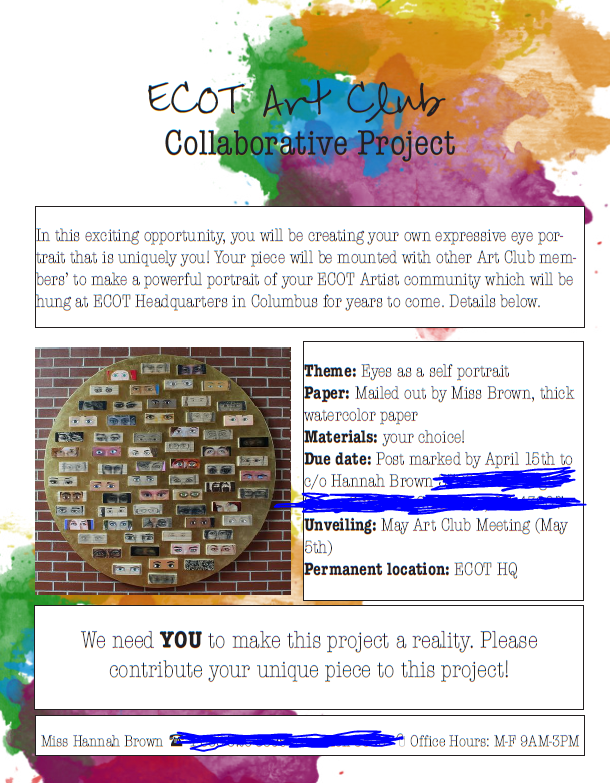
For years I have dreamed of creating a mural or other large artwork with my students. Logistically this can be a bit of a challenge with my students being scattered all over Ohio without the ability to converge in one location very often outside of graduation and perhaps prom. So this year I set out to make my dreams come true with a collaborative project for my Art Club students.


First came first, choosing a theme. For this one I was inspired by "The Eye Project" (above, more photos here). I liked this project because it shows the diversity of students but also ties them all together into one composition. Myself and the other Art Club facilitators held a meeting with students to discuss how eyes express ideas and emotions within artwork. We provided tutorials for creating eyes and encouraged students to think beyond a typical realistic eye if they wished.


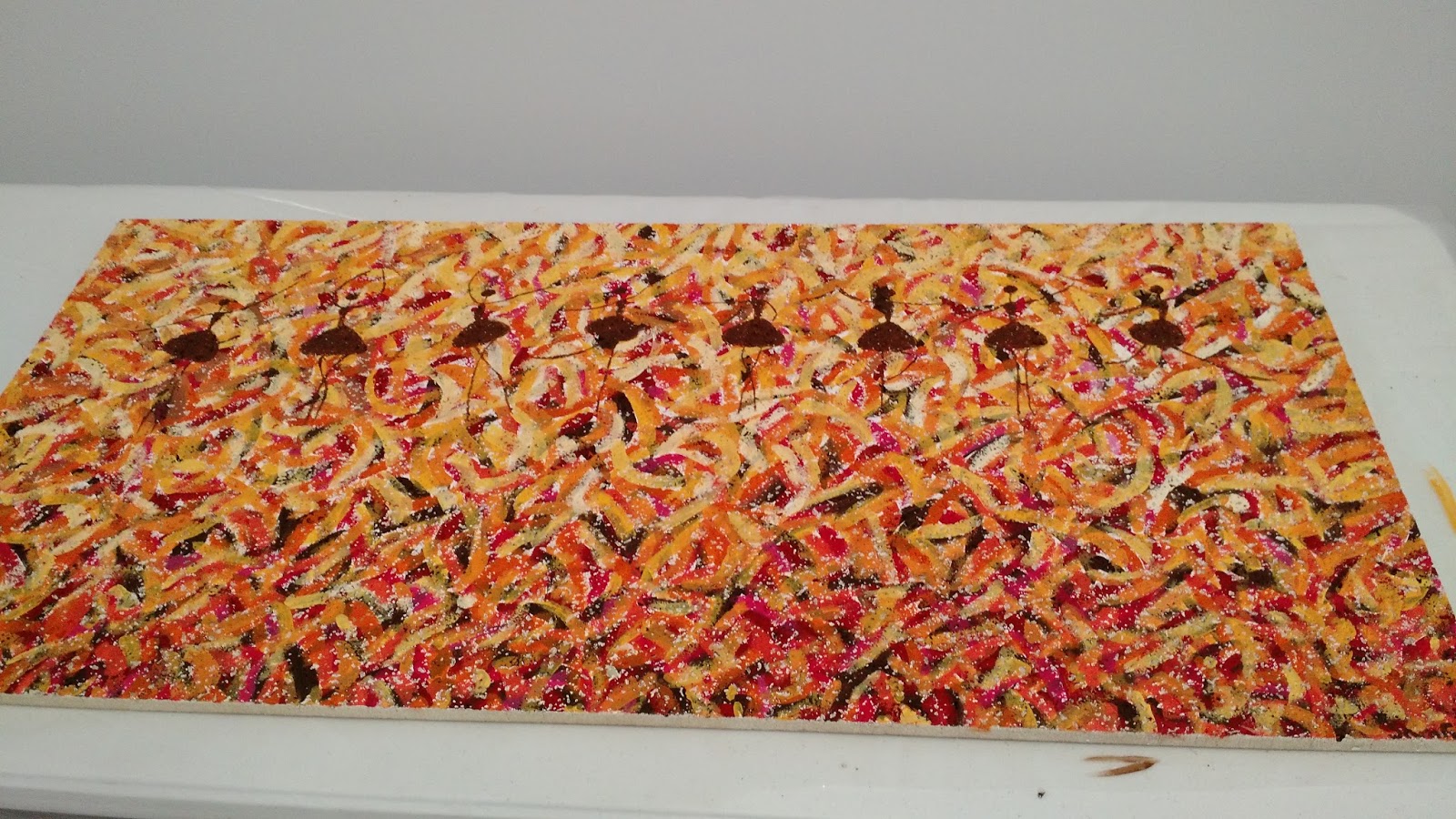
Second, I had students sign up so I could mail them the materials they needed for the project-in this case that included a letter of directions and a rectangular piece of watercolor paper. The students chose what media to work with for the project, created their compositions, and mailed them back to me. Then, I had a blast putting it all together. See below!


The final product!


Friday, May 6, 2016

Art Day: Intervention and Supplemental Opportunities

Last year, I had a crazy idea to meet one of my failing seniors in the library and work with him to complete the art projects he needed to pass and graduate. It worked! He successfully completed art right in front of my eyes. At that point I thought it would be great to offer this opportunity to more students. Lots of organizing and paperwork later, Art Day was born!


Yesterday, myself and 3 other teachers on my team, met at our school headquarters to facilitate a day of making art with failing students, many of them seniors. We each invited our struggling students and set up a room with 5 different stations for various projects in Art 1. We provided lunch, materials, and instruction. The result was awesome! The students really enjoyed working side by side and creating artwork. They are also now all passing and I am hoping Art Day will give them the confidence to continue working on their own.

On Art Day, we also had the opportunity to invite our advanced students to paint ceiling tiles for our headquarters building. Selected students from all levels of art were invited to paint the tiles and I am so impressed with their work! It was a really great day and fun to get both groups together for a day of artmaking.


Wednesday, April 13, 2016

Aiming for Higher Achievement

Over the past 5 years, I have written about my passing rate, reluctant learners, and working to increase the number of students successfully passing my Art 1 class to earn their fine art credit. But this year, I have grown tired of pulling teeth for my students to achieve the minimum. I am tired of begging for students to do work when I really want them to learn more than the minimum, try more than the minimum, and achieve more than the minimum. So, I wrote a goal on my whiteboard that hangs in my office this year, "Aim for A's, not just passing."
Until this semester, I believe I have been aiming too low at times for my students. So, this semester I have been working through some new strategies to increased achievement, rather than simply pass rate. And, it is working!
Here is what I have been trying:
Page 1 of the catch-up packet

  • Emailing all students who are missing assignments from the previous week every Monday morning with helpful strategies and scaffolding worksheets when applicable
  • Increasing my phone calls by an average of 20 more reaching out calls per week, encouraging students to complete their work and addressing any questions
  • Freeing myself of the "passing packet" and replacing it with a catch-up packet (click here to download) which includes more weeks of art projects, better directions, and is marketed towards improving a student's grade with no promises of receiving a passing grade.
Surprisingly, students seem to gravitate towards the catch-up packet far more than they ever did the passing packet, and it doubles as an intervention tool for students with an IEP or who simply prefer to work in a worksheet-style method. It works well as a way to help students who were added late to the course get caught up as well. 
We are only halfway through the semester and already I am seeing an overall 10% shift to higher achievement (letter grades) than at this time last semester! 
With 2% more A's and 8% more C's (and 8% less D's) I am over the moon. Go students go!

Tuesday, March 15, 2016

Process and Progress Checks

I think one of the biggest challenges I have teaching art online is helping students mid-project as I would if I were walking around a brick and mortar classroom. Of my two courses, Art 1 is the most fast-paced, and I am able to see a student's growth and process as they progress from project to project as well as through practice sketches and one-on-one sessions. However, I rarely see an "unfinished" project before I see the final one. This is because students are generally completing one project per week and students often do not choose to show me what they are working on in this condensed time frame. Art 5 is much slower paced with artwork being created over many weeks as they are higher level, more independent, and aimed at portfolio development. Thus, this course became my guinea-pig for developing ways in which to see a student's artistic process.
This year I have instituted progress checks for Art 5 students where they check in several times throughout the process of creating a piece of art. It is important in an online environment when working with students individually, to plan out structured checkpoints and have clear expectations. Each project begins with a brainstorming sheet such as the one below.
Following the brainstorming sheet, students have a progress check dropbox where they submit their project at least once before the final project. Though I only require them to show me one time, my students have all chosen to show me their work multiple times for each project. These progress checks give me an opportunity to give each student detailed feedback through screencast-o-matic and dialog about their artwork on the phone or via email. Below are a couple examples of progress checks and final work.
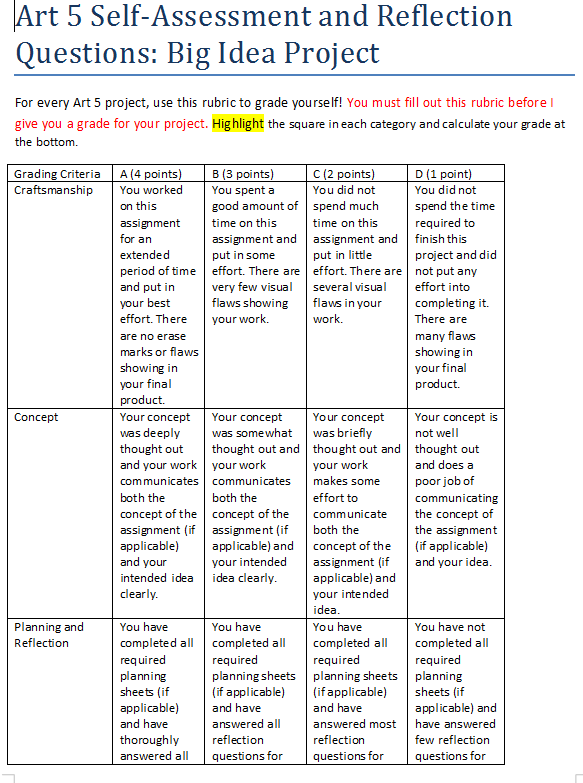
The conclusion of this process is reflecting upon the piece and self-assessment. In Art 5, students are encouraged to grade their own work in order to develop their skills of selecting work for a portfolio. They are also asked to answer reflective questions which differ based on the goal of the project. An example of one is below.

Adding progress checks to my Art 5 class has been very successful so far and I am receiving higher quality work from my students and having more conversations about their goals for each piece and how they are effectively communicating their ideas. How do you encourage process-oriented thinking in your classroom?


Friday, February 26, 2016

Dressing Up Engagement Strategies

As I mentioned in my September blog post, I have been working on making tip videos in my classroom which highlight tricky concepts for students and seek to correct misconceptions before they happen. I have been successful with these videos and noticed an increase in the quality of student work that I have been receiving since I made them. However, I noticed that some students were still not watching the videos (Screencast-o-matic lets me check my view count for each video). I did notice that I had a higher view count than any other week during the week that I dressed up for Halloween. This got me thinking, perhaps students would be more likely to watch a video if I dressed in something silly or unusual. Students are able to see a thumbnail of the video when I embed it into my announcements. Cassie Stephens, a fellow Art Ed blogger is the queen of dressing up for the art classroom. I am not quite to the point of making my own outfits, but here are some of my silly video outfits:

This seems to be entertaining students as much as it is entertaining me. My view counts have almost doubled since I switched to costumes!

Thursday, January 14, 2016

Tablets as an Option for Art Making

I am getting very excited about next semester starting next week and I am preparing my semester 2 classroom with new technology on my mind! Big surprise right? I have been working with my team this semester to create tablet options for all of my Art 1 projects. Previously, all projects were required to be done on paper through traditional techniques. However, I have found that students really enjoy the option of creating a different way and it also benefits students who do not have art supplies or are having problems with their scanner. Also, having a digital option prepares them for all kinds of careers and it helps meet UDL guidelines. So, I have finally done it!
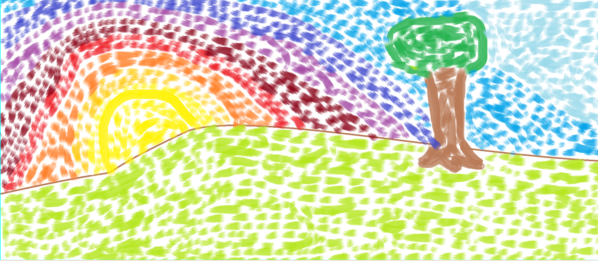
Each lesson in Art 1 offers two options for the assigned projects: a traditional option and a tablet option. All of my students have Android tablets to work on and all the apps I use in my class are free. Some of my projects offer a similar option for the tablet option as the traditional. For example, students may paint traditionally for their Impressionist Landscape, or they may use a painting app such as Sketch Guru.
Traditional watercolor
Using Sketch Guru
Other assignments have a different way for students to show their understanding of a given concept. For example, for my proportion lesson involving foreground, middle, and background students are able to draw the interior space of a room with pencil, or they can create a digital collage using PicCollage. Both assignments accomplish the creation of a piece that shows depth and understanding of proportions but some students might prefer one over the other. 
Traditional drawing

Using PicCollage to manipulate images
Some of these apps add additional materials for students to use that they would not have access to at home easily such as the texture tablet option. Students are learning about visual and tactile texture and then asked to either create a drawing showing 4 textures or create a sculpture showing 4 textures in TrueSculpt
Traditional drawing
Using TrueSculpt
I thoroughly believe in teaching traditional art skills and would never want to move towards 100% digital in my classroom but I think options are important. I am excited for students to have the opportunity to experience more diverse materials in their art making and get a taste of digital art if they choose. Stay tuned! 
Shameless plug: I'll be giving a presentation at NAEA this year on Saturday at 2pm all about using free Android apps in your art classroom!


Friday, September 25, 2015

Addressing Weaknesses and Clarifying Concepts

This school year I am working on addressing common mistakes students have made during previous years at the beginning of a lesson so they can be more successful this year. I am doing this through a short weekly video announcement.


Each video presents 3 tips for the current project. I am getting a good amount of student views on these videos. Aside from increasing the quality of student artwork, these videos also serve as a weekly greeting from me that my students see when they enter the classroom. 

Tuesday, July 7, 2015

Impressionist Landscape Watercolor

I have been really enjoying teaching my summer school class so far. My students are creating wonderful artwork and making meaningful connections with the world around them. It has been awhile since I brought my Google Glass out for a spin to create a demonstration video, but today I took it on an adventure in painting "en plein air".


I am very excited to see what students create for this project and I was happy to have an excuse to go paint outside on a beautiful day like today.

Wednesday, May 13, 2015

Buried Treasure: Communicating Learning Outcomes

We all have goals for our students. Whether they be state standards and benchmarks we are aiming for our students to hit, or more student-friendly learning outcomes written in language that students understand. I have seen this illustrated in different ways in classrooms I have visited. Sometimes they are posted on the wall by grade level, other times they are printed on syllabi or posted on the introduction page for a lesson.
It is important for students to understand what they are going to gain from our classes and I think sometimes this gets lost somewhere between when we share these desired learning outcomes and when they go in one ear and out the other for students, or aren't read or heard in the first place.
For years, I have wanted to develop a fun an visual way for students to see what they are learning in my Art 1 class and how they are learning it. In my school we use the term "course map" to describe the document that houses all of our learning outcomes and assessments for a course. I decided to create a REAL course map modeled after a treasure map, because as we all know, learning is like discovering new exciting gems!

Click to enlarge
I made this map in Photoshop and really enjoyed it because I am a big nerd. I hope that my new map catches the eyes of my students and helps them understand the journey they are taking in my class. What ways can you think of to help students understand the "what" and "why" of their learning in your class?

Tuesday, April 21, 2015

Active Learning in the (Online) Art Classroom

As part of my the Online Teaching and Learning Certificate I am currently pursuing, I recently took a course all about creating interactive learning objects for my classroom. A learning object is an interactive activity which presents lesson material to students in a way that offers opportunities for practice and sometimes employ digital storytelling. Learning objects are great because they allow students to explore a topic at their own pace, offer practice and feedback, and sometimes even provide branching (think choose your own adventure) that takes a student through a branch based on their responses. The possibilities are endless and learning objects can be implemented in all types of learning environments including brick and mortar or blended art rooms. They can be a great opportunity for independent learning, without being as static as book work.

Creating a learning object can be hard work! I spent weeks creating one all about Feldman's Model of Art Criticism that puts students in the role of the art critic. I used Articulate Storyline to create my learning object which provides many interactive features and is fairly intuitive to use. This tool does have a cost associated with it, but there are many free tools available (click here for a list) and it is even possible to create learning objects through Microsoft Powerpoint by adding links to buttons.

But, there is an easier way to start using learning objects (LO's) in your art classroom without creating them. There are many art education learning objects already created online.

Here are some of my favorite Art Ed learning objects:

This activity is the one I created which puts the student in the role of the art critic and presents Feldman's Model of Art Criticism. 

This LO allows the student to explore the elements of art and practice using them in a free form composition tool. 

This LO allows students to test the affects of a manual DSLR camera.

This LO explores the color wheel, tints, tones, shades, and color schemes. It also allows for students to practice blending colors and building their own color wheel. 

These links barely scratch the surface of what is out there so explore on your own as well. I have really enjoyed learning about new ways to insert some interactivity into my asynchronous environment and I hope you enjoy them too!


Friday, March 27, 2015

Facilitating Individual Learning Synchronously

This semester has been a very busy one. As all teachers know, each group of students and each student we teach is different from the last. Last semester I had a very independent class as a whole who did not generally find synchronous sessions to be necessary to attend. This semester, I have a group that finds my synchronous sessions to be the ideal place for them to complete work and I have many students who attend once or twice every single week.
In general, I would say that online education encourages students to be more independent than they would be asked to be in a brick and mortar setting. Students need to be able to find and access lesson material independently and need to take steps to ask for help when they don't understand something. This can be particularly difficult for students who special needs or who just learn better with structure facilitated by a teacher and direct instruction. I have students on both ends of the independence structure this semester and I have been able to create a synchronous environment that students who need more structure seem to enjoy and depend on each week.

I have written about my Open Art Room before, but this semester is has been used more than any other! I now have step-by-step powerpoint presentations of every single art project in my Art 1 class and students are eating it up. I put my slides on "roam" so many students can access different pieces of the content at the same time as needed. I have also been able to employ students' webcams for them to show me their work in progress and once it is complete. Open Art Room provides students a space where they can get the lesson content in a different way than reading the classroom pages and get individual help along the way.

Sunday, February 8, 2015

Video Feedback

After a bit of a rough semester due to lack of attendance in my live sessions, this semester I have decided to re-focus my efforts on rapport and community building in my classroom. I have several new techniques I am trying in order to do this, but I wanted to share one of these today.

This school year, I have been using a screencasting tool called Screencast-o-matic to provide snippet lessons to my students (more about that here). This semester, I have also been using this tool to provide personalized feedback to my students about their artwork. Below is a sample:


 Video feedback allows students to hear what I have to say in my own voice. It also allows me to draw on the screen in a more animated way than I have been able to before-see here. See below.

I have found that about 80-90% of students watch these videos (something I was not able to track before) and students seem to be more willing to make a revision and resubmit than they are with written feedback alone. I am enjoying giving students feedback in this way and hope to see even more improvements in their work throughout this semester as well as improved rapport!

Friday, January 30, 2015

Course Building

As I continue to learn about the various best practices for creating curriculum for online learning, I have chosen my Art 5 course as the curriculum that I am going to beef up in my University of Cincinnati course on curriculum design for online learning.
I have revised this course several times since I began teaching it 3 years ago. At first, I set up the course in an independent study style where I expected that students would be able to design, plan, and create their own art projects. I assumed all of my students had enough experience in 4 levels of art before my course that they would feel comfortable being autonomous with a coach or guide giving feedback. What I found is that students wanted more direction.
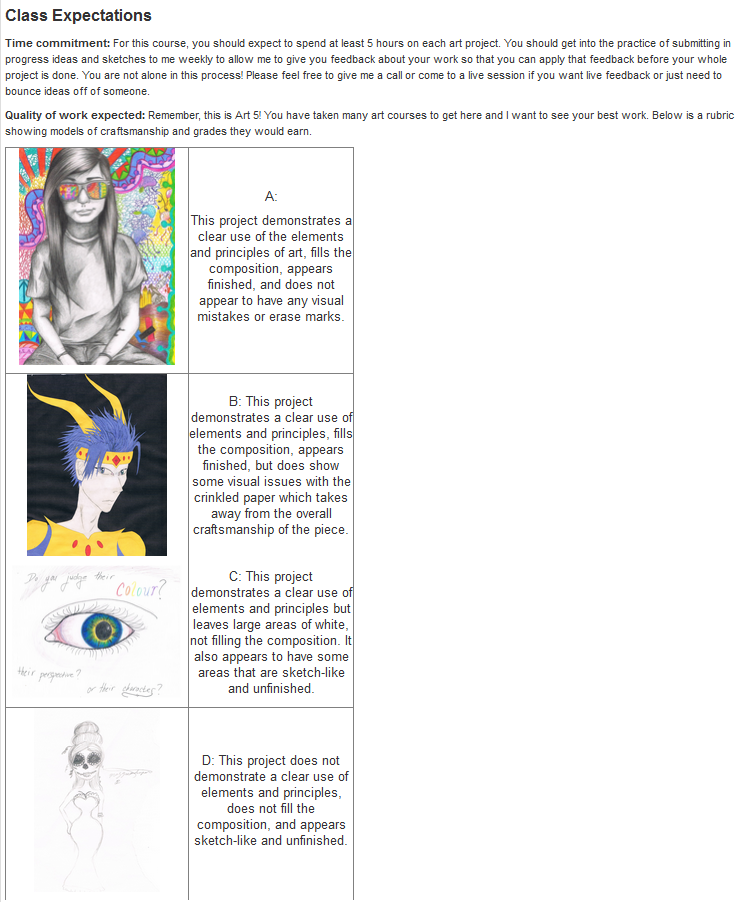
The second version of Art 5 included more conceptual direction for students with parameters for them to follow but freedom to choose materials and make compositional choices. For several years this has worked but I have noticed that students are not putting forth their best work technically or spending the time required on these projects. This is a challenge when working with students online because they do not have idle studio time to fill like they would in a brick and mortar classroom. They choose how long they work on a project and many times they do not plan for long enough when left to their own devices. This, along with the motivation from class has caused me to create a course overview page that explains to students what I expect of them.
I am also working on altering a few of my weaker lessons to include some technical demonstrations and challenges for my students. Other advanced/AP art teachers, how do you push your students to give you their best work? What kinds of projects would you offer for a portfolio development class? Any ideas are appreciated!

Friday, December 12, 2014

"Blank Space" Art Teacher Verison

Today I got a little crazy and made a new welcome video for my semester 2 classroom. I cannot wait to hear what they think!

Thursday, December 11, 2014

Whatever it Takes

I have hit a little bit of a static time within my classroom these past few months. I haven't had many new teaching strategies I've been trying as I have been focusing much of my time leading my colleagues in completing the Ohio 5-Step Process as Teacher Based Teams. Leadership is also the focus of the 4th year of the Ohio Resident Educator Program which I have been working on as well. It feels refreshing that this week I have finally been able to focus more on helping individual students.
As I have said before, one of the strengths of an online environment is being about to work with students on an individual basis, in fact it is much more rare for me to work with students as a group. This week I have been focusing on engaging students who have not been successful on their own as of yet. Previous to this week I sent out letters, made calls to parents and students, and sent countless emails to attempt to engage these reluctant learners.

This week, I tried putting my money where my mouth is so to speak and invited these struggling students to one-on-one synchronous sessions. For these sessions I prepared slides that walk students through each step of every project in my course. I invited students to attend via phone calls and individual emails (with their names in the subject line!). Once a student entered the classroom I would direct the students through each project step-by-step using the slides on the board and demonstrating each step over the my document camera. These sessions did get pretty lengthy but students were willing to stay, with the goal of passing the course at the end of our time working together. I'll be honest, until this week I have had lackluster attendance in my synchronous sessions, but these catch up interventions are working their magic on some of my most difficult to reach students.

Monday, October 27, 2014

Using Video Snippets in the (Online) Classroom

I have always been a proponent of video in my classroom. They offer great demonstrations of both vocabulary and techniques in a way that visual learners benefit from. Here is a link to some samples the videos I have created that fit into the demonstration category. 


Recently, I have started using videos in a few new ways due to the ability to pull in videos from sources like YouTube and embed them into my classroom pages. I use short, fun videos that I find to spark discussion via reflective questions. I have had a weekly discussion board in the past where I use articles from Scholastic Art to generate discussion, but I have found it is fun to mix up the sources that students are viewing, and it can lead to some great creative thinking! 


This is the first video I used in my discussion board. I looked for videos that were less than 5 minutes long and that could be used to prompt students to think about the big question, "What is art?" I asked them to reflect on the following:
1. Which definition of art from the video do you most agree with?
2. Do you think “bad” art still art? Why or why not?
3. At this moment, what do you think is the most important function of art?
At this point in the course, students have had a little bit of exposure to different styles of art but have mostly focused on drawing techniques. I really enjoyed reading their responses, especially from the third question as it prompted a great range of ideas from personal expression to visual communication and everything in between. 


The other more recent use of videos in the classroom is a variation on recorded live lessons I have used in the past. I have always recorded my synchronous lessons for students to watch at a time which is convenient for them (check out this post for more information on how that works). However, due to a shift in focus this year in my live instruction schedule, I haven't had a high attendance rate for my lessons each week. With this change and the availability of a new tool called Screencast-O-Matic I have begun to make lesson snippets: an overview of lesson content for the week summed up in 5-10 minutes. This week I am out of my office for much of the day due to state testing, so it is especially important that I was able to post a short lesson video into my weekly announcements for students to access this week while they are working. 

Wednesday, September 3, 2014

Video Game Connections

I am going to admit it, I am a big video game geek! And this week in my classroom I am using video games to build rapport with students and help them connect their learning to the world outside the classroom.
This week they are learning about the foreground, middle, and background. So, I began the lesson with a slide showing how video game artists employ the element of proportion when creating a fictional world. For this example I used my own character from World of Warcraft. The example seemed to catch student interest. 
When I teach this lesson, some of my students have difficulty drawing a room from their own point-of-view for the first time (their assignment for the week). I receive drawings that look like blueprints or where the furniture looks flat or as if it were drawn from several different angles. I decided I wanted to emphasize the idea of drawing what they see by sharing some video game screen shots. The first displays the character, followed by what they see, and finally what a sample drawing could be from that scene.


This week I also included a short writing prompt which I found in Scholastic Art Magazine about video games. The article is called "Is There Art in Your Xbox?". Students read the article and reflect on the questions, "Do you believe that video games are art? Why or why not?". So far I have gotten some great responses and I am excited to help students make connections to different forms of art they already interact with. Later this month, my students will be invited to a field trip at a local art museum to see "The Art of Video Games" an exhibition that focuses on the emergence of video games as a form of storytelling.